Pools for CLIProxyAPI
By Gabriel Voicu, published
I pay for more AI than I like to admit: two Claude subscriptions, a ChatGPT plan for Codex, Devin, a couple of Anthropic API keys and some OpenRouter credit. All of it runs behind CLIProxyAPI on my laptop. This is about the small plugin I wrote so that one model, coming from all those places, behaves like one model.

What CLIProxyAPI is
CLIProxyAPI (CPA for short) is an open-source proxy from router-for-me. You run it on your own machine, sign in with the subscriptions you already have (Claude Code, ChatGPT Codex, Antigravity, Grok Build, Muse Code, Devin and others) or add API keys, and it serves all of them as one local API that speaks the OpenAI, Claude and Gemini formats.
That means any tool that can talk to an OpenAI- or Anthropic-style endpoint can use your subscriptions: Claude Code, Codex, the pi coding agent, your own scripts. You stop juggling a login per tool and a bill per vendor.
Your tools
- Claude Code
- Codex
- pi
- Your own scripts
CLIProxyAPI, on your machine
- One local API in the OpenAI, Claude and Gemini formats
- Spreads requests across your accounts
- Cools an account down at its limit
Your accounts
- Claude subscriptions
- Anthropic API keys
- ChatGPT Codex
- Devin
- OpenRouter
CPA also does the tedious parts of running several accounts. It spreads requests across them, can keep a conversation on the same account so its prompt cache stays warm, and puts an account on cooldown when it hits a limit and moves on to the next. It comes with a web console and supports plugins.
One model, many names
CPA spreads requests across every account that serves a model under the same name. The catch is that each provider names the same model differently. Claude Opus 5.5 is claude-opus-5-5 on a Claude login and on an Anthropic key, devin/claude-opus-5-5 on Devin and anthropic/claude-opus-5.5 on OpenRouter. To CPA those are three different models, so a request for claude-opus-5-5 never reaches Devin or OpenRouter.
What each account calls Claude Opus 5.5
- Claude login:
claude-opus-5-5 - Anthropic API key:
claude-opus-5-5 - Devin:
devin/claude-opus-5-5 - OpenRouter:
anthropic/claude-opus-5.5
The pool
claude-opus-5-5- The one name your tools ask for. CPA spreads it across all four accounts.
CPA has aliases for this: you can tell Devin's account that devin/claude-opus-5-5 should also answer to claude-opus-5-5. But aliases live in three places. Logins keep them in their own credential files, API keys in their model lists in the config, and a global section applies them to a whole provider. Doing it by hand, I ended up with sixteen stale aliases on one account, and with model lists that called my pool "Claude Opus 5.5 (Devin)" because of whichever member CPA happened to see last.
I wanted to pick a model on one page and have every account that offers it join.
What the plugin does
Pools and Aliases adds a page to the CPA console. A pool is one model served by several accounts or keys.
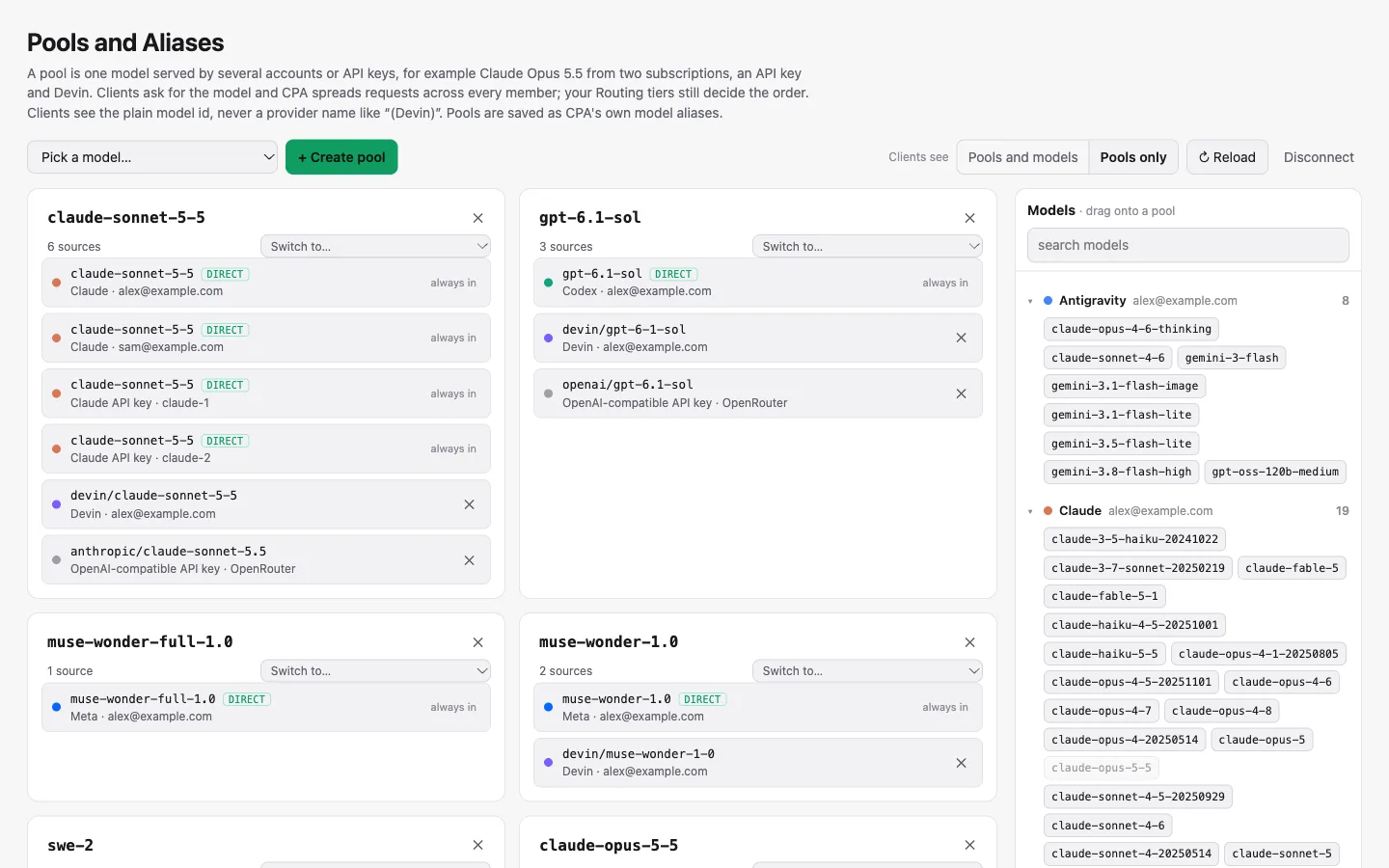
- One model per pool. The pool's name is the model's own id, so your tools price it, size its context and offer its reasoning levels as that model. When one account fails, CPA moves to another member, and you are still talking to the same model.
- Accounts match across providers. The page ignores the vendor prefix, letter case and punctuation, so
devin/gpt-6-1-solandgpt-6.1-solland in the same pool. Dropping a different model on a pool is refused. - New accounts join on their own. Sign in to a new account or add a key, open the page, and it is already in the pools for its models, waiting for you to save. Remove a member and it stays out.
- Clean names. In every model list CPA serves, a pool shows as its plain id, with no "(Devin)" or other provider label.
- Pools only. One switch hides every model that isn't in a pool, so the model pickers in your tools show only what you use. A tool that asks for a hidden model by name still gets it.
- Switch to. When a new version of a model ships, one action moves every member of the pool to it.
Every save first shows the exact changes it will make, account by account.
It writes CPA's own aliases
The plugin doesn't route anything. A pool is saved as ordinary CPA aliases, in the credential files for logins and in the model lists for API keys. CPA's own routing settings still decide which account goes first. If you uninstall the plugin, your pools keep working.
That mattered to me. I wanted a better way to edit what CPA already does, and nothing extra sitting between my tools and the models.
How to use it
You need CPA 8 with plugins enabled. I have tested it on 8.0.50 and 8.0.53.
- Install it. I've submitted it to the CPA plugin store; once it's listed, open the Plugin Store in the console and install Pools and Aliases. Until then, download the zip for your system from the releases page and put the file inside it into your plugins folder.
- Enable it in the CPA config, then restart CPA once:
plugins: enabled: true dir: "~/.cli-proxy-api/plugins" configs: cpa-pools-and-aliases: enabled: true - Open it from Plugins → Pools and Aliases in the console. If you saved your management key when you signed in to the console, the page uses it; otherwise it asks once.
- Create a pool. Pick a model in the list at the top and press Create pool. Every account and key that serves that model joins.
- Save. Read the list of changes and confirm. CPA picks them up straight away, no restart needed.
Your tools don't change. They keep asking for claude-opus-5-5, and CPA now spreads those requests across every member of the pool.
Things to know
- API keys without a model list. Such a key serves every default model of its provider. Giving it a pool member also writes those default models into its list, so it keeps serving them. The review tells you when this happens.
- Some members are always in. An account that already serves the exact model id is part of the pool whether you like it or not, because CPA includes it automatically. The page marks it direct. To leave it out, exclude the model on that account in CPA.
- Prompt caches belong to accounts. A request that moves to another member starts with a cold cache. Turn on CPA's session affinity so a conversation stays on one account.
Get it

Pools and Aliases for CLIProxyAPI, version 1.0.0. Free and open source under the MIT licence.
- Source and documentation: github.com/ngvoicu/cpa-pools-and-aliases
- Downloads for macOS, Linux and Windows: releases
- CLIProxyAPI itself: github.com/router-for-me/CLIProxyAPI
I build tools like this for my own AI-native setup, alongside Specmint (durable AI coding specs), Kluris (team knowledge brains) and ConsensFlow (a team of coding agents). If you're taking your team AI-native, start with Becoming an AI Native Company.